On this page
IEEE 802.11be-20249.4.2.3219.4.2.3229.4.2.3239.4.2.32535.3.12.435.15.1
Device: retail Wi-Fi 7 router, factory reset. 6 GHz channel 69 at 320 MHz, 5 GHz channel 149 at 80 MHz, MLO off.
Runs: 3 per MLO-off configuration plus 2 extra, 969 beacons in the main run, counted two ways.
MeasuredEHT Operation and Capabilities fields, beacon versus probe response, element 110 in every beacon.
InferredSingle-link MLD with MLO off. Why the probe response omits 110.
OpenWhy this AP sends 110 without buffered traffic. Not tested: downlink traffic to a sleeping client.
Episode 2 · About 12 minutes
A Wi-Fi 7 beacon says more than most people read from it. In this episode I decode one from a retail access point against IEEE Std 802.11be-2024, Amendment 2 to IEEE Std 802.11-2024.
Decode the byte: EHT Operation Parameters = 0x45
Tap a bit to see what it means.
That is the Wi-Fi 7 beacon, read against the clause and a real capture. If I read a field wrong, tell me.
Select a bit.
I captured the beacons of a retail Wi-Fi 7 router and read them against the standard. The AP runs a 320 MHz BSS on 6 GHz, and the beacon says so in three bytes. A probe response from the same AP, about a minute later in the same capture, carries the same EHT elements as the beacon except one. This article walks through what is in the beacon, what each field means, and why that one element is missing from the probe response.
All captures come from my own lab. The AP is a retail Wi-Fi 7 router that I factory reset and set up with a single SSID, E002, with MLO off. I read the settings back from its web interface: 6 GHz on channel 69 at 320 MHz, beacon interval 100, DTIM period 1, and OFDMA, TWT and MU-MIMO all switched off. I did not test whether those switches change what the beacon advertises. I cite clause numbers and put the fields in my own words. The standard is copyrighted, so keep your own copy of IEEE Std 802.11be-2024 open next to this.
What I captured
Three bands, one AP: 2.4 GHz channel 7 (HE only), 5 GHz channel 149 at 80 MHz (EHT), and 6 GHz channel 69 (EHT). I sniffed all three at once with a Wi-Fi 7 capture unit, and also cross-check with a Wi-Fi 6E capture unit. A Wi-Spy swept 2.4 GHz alongside. The 6 GHz radio was tuned to 6g69/320-2 so the sniffer saw the full 320 MHz.
I ran six 100 second captures. Three with MLO off (A1 to A3), three with MLO on (B1 to B3). This article uses MLO off, run A1, and the other two for repeatability. MLO on is for a later episode.
The sniffer check comes first, as in E001. At a beacon interval of 100 TU (102.4 ms), 100 seconds should hold about 977 beacons. The three MLO-off runs on 6 GHz hold 969, 968 and 968. That is 99 percent. I counted them two ways: with tshark, and with my own short script that reads the pcap, skips the radiotap header and counts management frames of subtype 8 from the AP’s BSSID. Both give 969 for run A1. One MLO-on run on 6 GHz (B3) holds only 882. The sequence numbers explain it. The AP’s beacon sequence numbers skip 88 values in that run, and 969 minus 882 is 87, so the AP sent them and the sniffer missed them. The Wi-Fi 6E capture unit on the same channel saw 936. I did not use that run.
The Wi-Fi 7 beacon at a glance (6 GHz)
The beacon is 366 bytes in the capture, radiotap header included. Extension element IDs, in the order they appear: 35, 36, 39, 38, 59, 107, 108, 106, 110. Element ID 255 is the wrapper, and the extension ID tells you which element it is. In 802.11be the ones that matter here are 106 (EHT Operation), 107 (Multi-Link), 108 (EHT Capabilities) and 110 (Multi-Link Traffic Indication). I checked these IDs against the extension ID table in the IEEE802.11 standard.
Wireshark 4.4.18 labels every one of these “802.11be D3.0”. It was written against draft 3.0, not the published standard. The IDs and the structure match what I read in the final text, but some field names differ. Where they do, I use the name from the standard and say so.
EHT Operation (9.4.2.321, ext ID 106)
This element tells a client how the BSS is configured. It is short: 8 octets after the extension ID in this beacon.
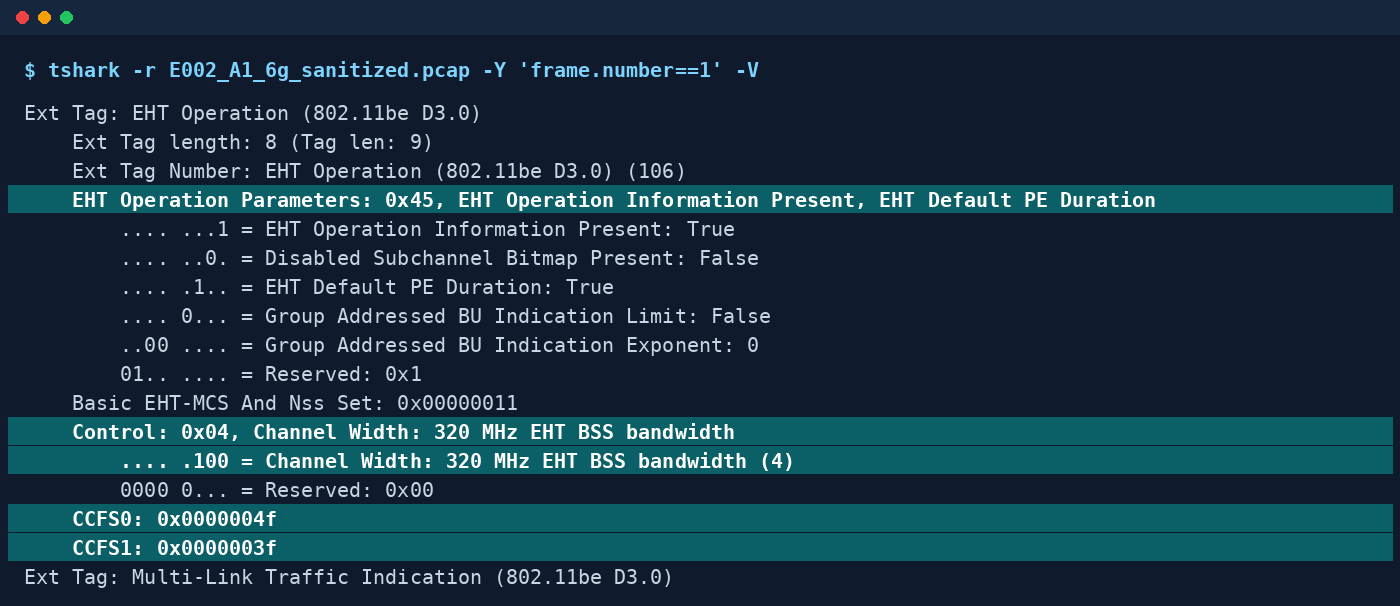
The EHT Operation Parameters byte is 0x45. In binary that is 0100 0101, and the fields read like this. Click the bits in the box above to see them.
- Bit 0 is 1: the EHT Operation Information field is present.
- Bit 1 is 0: no Disabled Subchannel Bitmap, so nothing is punctured.
- Bit 2 is 1: EHT Default PE Duration. A TB PPDU solicited by a TRS Control subfield gets a 20 microsecond packet extension.
- Bits 3 to 5 are 0: no limit on group addressed BU indication, exponent 0. These only matter with multiple BSSIDs.
- Bit 6 is 1: MCS 15 Disable. The AP does not receive EHT PPDUs using MCS 15 in both the data and EHT-SIG fields.
The Basic EHT-MCS And NSS Set is 0x00000011. That field says which MCS and stream combinations every STA in the BSS must support. The value says: MCS 0 to 7, one spatial stream, receive and transmit. Nothing else is mandatory. A phone with one antenna can join. This is a floor, not what the AP supports.
Then the part I care about most: the EHT Operation Information field. The Control subfield is 0x04, which is Channel Width 4, a 320 MHz EHT BSS. CCFS0 is 79 and CCFS1 is 63.
CCFS means channel center frequency segment. The standard defines them depending on the width. For 320 MHz, CCFS0 is the center of the primary 160 MHz channel, and CCFS1 is the center of the whole 320 MHz channel. So the AP is saying: the 160 MHz half that holds my primary channel is centered on index 79, and the full 320 MHz BSS is centered on index 63. In the 6 GHz band, index 63 is 6265 MHz, which is the 320-2 channelization. My primary is channel 69, inside the upper 160 MHz half. That matches what I tuned the sniffer to, and it is the check I use to know the sniffer sees the whole channel.
The 5 GHz beacon from the same AP has an EHT Operation element too, but the parameters byte is 0x44 and the Information Present bit is 0. There is no Control, CCFS0 or CCFS1 at all. That is correct. In 35.15.1 the standard says an EHT AP sets that bit to 1 only when it is on 5 or 6 GHz, announces a different width to EHT clients than to non-EHT clients, and that width is 320 MHz or has a punctured subchannel. On 6 GHz at 320 MHz all of that is true. On 5 GHz at 80 MHz it is not, so the width comes from the older operation elements and the EHT element does not repeat it.
EHT Capabilities (9.4.2.323, ext ID 108)
Operation describes the BSS. Capabilities describes what the device can do. It has four parts: MAC capabilities (2 octets), PHY capabilities (9 octets), the supported MCS and NSS set, and optional PPE thresholds.
MAC capabilities are 0x0005. Two bits set: EPCS Priority Access Support (bit 0) and TXS Mode 1 Support (bit 2). Wireshark calls the second one “Triggered TXOP Sharing Mode 1”. The standard calls it TXS Mode 1, which means the AP can send an MU-RTS TXS Trigger frame that gives a client time to send a non-TB PPDU to the AP. Restricted TWT, SCS traffic descriptors and EHT OM control are all 0.
The Maximum MPDU Length field reads 0, which is 3,895 octets in the table. Read the clause: that field is reserved when sent in 5 GHz or 6 GHz. So the 0 in this 6 GHz beacon tells you nothing. If you only read the dissector line, you would think the AP is limited to 3,895 byte MPDUs. It is not a limit. This is why I check every field against the clause and not only against the dissector.
PHY capabilities are where Wi-Fi 7 shows up. Bit 1 is Support For 320 MHz in 6 GHz, and it is set. That is the AP telling clients that non-OFDMA 320 MHz PPDUs are allowed here. SU beamformer and beamformee are both supported. Number Of Sounding Dimensions is 1 at 80, 160 and 320 MHz, which I read as two dimensions, consistent with a 2×2 radio. MU beamformer is supported at all three widths. EHT DUP (MCS 14) in 6 GHz is supported. These are bits in the capture, not measured throughput.
The Supported EHT-MCS And NSS Set holds three maps, one for 80 MHz or less, one for 160 and one for 320. Each is 0x222222. Each 4-bit nibble is a maximum number of spatial streams for a group of MCS values, receive then transmit, for MCS 0 to 9, 10 to 11 and 12 to 13. A 2 in every nibble means two streams for every MCS from 0 to 13, at every width. MCS 14 and 15 are single-stream and are signaled in the PHY bits, not here.
So in two elements the AP says: 320 MHz channel centered on index 63, two streams, MCS up to 13. That is consistent with a 2×2 Wi-Fi 7 radio on 6 GHz. The beacon advertises what the AP supports, not what it delivers.
The Multi-Link element with MLO off (9.4.2.322, ext ID 107)
I expected no Multi-Link element in the beacon with MLO turned off. It is there. The element is Basic type, with a Common Info field that carries an MLD MAC address, a Link ID of 2, EML capabilities with EMLSR support set to true, and an MLD Capabilities field. There is no Link Info field, so there are no Per-STA Profile subelements. Wireshark labels this a Basic STA Profile Count of 0.
My reading of this is that the AP is an MLD with a single affiliated AP. The BE200 client I used agrees. It associated to the 6 GHz BSSID and its supplicant reported an AP MLD address and a Link 2. The AP MLD address differs from the BSSID in one octet. I did not see the AP’s internal state, so I am inferring the single-link MLD from the beacon and the client side logs, not from the AP.
What the probe response drops
Now the missing element. I compared a beacon (frame 1) and a probe response (frame 624) from the same BSSID on 6 GHz.

Beacon: 35, 36, 39, 38, 59, 107, 108, 106, 110.
Probe response: 35, 36, 39, 38, 59, 107, 108, 106.
The only difference is 110, Multi-Link Traffic Indication. In the standard, the Beacon frame body (9.3.3.2, Table 9-62) lists it as order 98. The Probe Response frame body (9.3.3.10, Table 9-69) has no entry for it. That is a match.
The reason is in the element’s purpose (9.4.2.325). It carries per-link traffic indication bitmaps for non-AP MLDs. It sits next to the TIM element in a beacon and tells a sleeping client that there is buffered traffic and which link to wake up on. A probe response does not carry the TIM element, and a client reads it for the BSS parameters, not for buffered traffic. That is my reading of why it is absent, not something the standard states in those words.
One more thing I found, and I tested it twice. The traffic indication clause (35.3.12.4) says an AP MLD shall include this element in a beacon if either of two conditions is met. The first is that an associated non-AP MLD does not have all TIDs mapped to all enabled links and the AP MLD has buffered traffic for it with TIDs that are not mapped to all enabled links. The second is that the AP MLD intends to give link recommendations in a beacon to an associated non-AP MLD that has all TIDs mapped to all enabled links, and the AP MLD has buffered traffic for it. Otherwise it shall not include it. This AP includes it in every beacon, all 969 in run A1, with a Traffic Indication List of 00. So I ran two more captures with MLO off. In the first, I disconnected my BE200 so the AP had no client of mine associated. That run has 679 of 679 beacons on 6 GHz and 651 of 651 on 5 GHz carrying element 110. In the second, the BE200 was associated, in power save and idle. That run has 677 of 677 on 6 GHz and 642 of 642 on 5 GHz. The AP includes the element whether or not anyone is associated.
I read that as not following the clause. Both conditions need traffic buffered for an associated non-AP MLD, and in the first extra run no client of mine was associated at all. Two limits. I cannot see dot11MultiLinkTrafficIndicationActivated on the AP, so I do not know how the vendor sets it. And I did not push downlink traffic to a sleeping client, because I had no path to it, so I did not test the case where the clause says it should appear.
What I did not check
One AP, one firmware. Three runs per MLO-off configuration, plus the two extra runs for element 110. The captures are 70 to 100 seconds, so I saw no change in BSS parameters. I did not measure throughput, so the capability bits say what the AP advertises and nothing about what it delivers. The Wi-Fi 6E capture device does not decode EHT, so it only confirmed that the frames were on air. I did not look at EHT PPE Thresholds or the 5 GHz beacon in field-level detail.
Try it yourself
Download the sanitized captures, filter sheet and SHA-256 checksums: E002_sanitized_captures_v3.zip (four pcapng files, FILTERS.md, SHA256SUMS; about 110 KB). All MAC addresses are rewritten and neighbouring network names removed. Start with these.
wlan.fc.type_subtype == 0x08 && wlan.ext_tag.number == 106
wlan.fc.type_subtype == 0x05 && wlan.ext_tag.number == 110
The first lists beacons that carry EHT Operation. The second should show nothing on a probe response capture.
Next week: Multi-Link element in detail, with MLO switched on. Same AP, same sniffer.
Clause references: IEEE Std 802.11be-2024, 9.4.2.321 (EHT Operation), 9.4.2.322 (Multi-Link), 9.4.2.323 (EHT Capabilities), 9.4.2.325 (Multi-Link Traffic Indication), 9.3.3.2 (Beacon), 9.3.3.10 (Probe Response), 35.3.12.4 (traffic indication), 35.15.1 (basic EHT BSS operation).
Watch and follow
Watch the video for this episode: https://youtu.be/I4knGANlb10
Next week: E003, what an MLD is.
Resources
- IEEE Std 802.11 on the IEEE Standards site
- Wireshark display filter reference: wlan
- Wireshark documentation
- tcpdump.org
Cite this article
If you use this in your own notes or a report, this is how I would like it cited.
Next episode
E003 explains what an MLD is, and how a beacon shows you one. It is not live yet.
Your turn
Have you captured the same thing on another access point? I would like to read what you saw, on LinkedIn or in the comments.

Leave a Reply
You must be logged in to post a comment.